How to Stay Safe Online in 2026: Essential Tips & Best Practices
In January 2026, with billions of people connected through smartphones, smart homes, and IoT devices, online safety has never been more critical. Cyber threats like phishing, ransomware, identity theft, and data breaches are evolving rapidly, powered by AI and sophisticated tactics. Staying safe online isn't about paranoia—it's about adopting smart habits and tools that protect your privacy, finances, and personal data. This detailed guide (over 1,700 words) covers proven, practical strategies to safeguard yourself in today's digital world, with real-world examples and step-by-step advice for beginners and advanced users alike.
1. Use Strong, Unique Passwords and a Password Manager
Weak or reused passwords are the leading cause of account breaches. In 2026, brute-force attacks and credential-stuffing (using leaked passwords from one site on others) remain rampant.
Best practices:
- Create passwords at least 16 characters long, mixing uppercase, lowercase, numbers, and symbols.
- Never reuse passwords across accounts.
- Use a reputable password manager like Bitwarden, 1Password, or LastPass to generate and store complex passwords securely.
Example: The 2023 Twitter breach exposed how reused passwords led to chain reactions across users' other accounts.
Password managers also autofill credentials securely, reducing phishing risks.

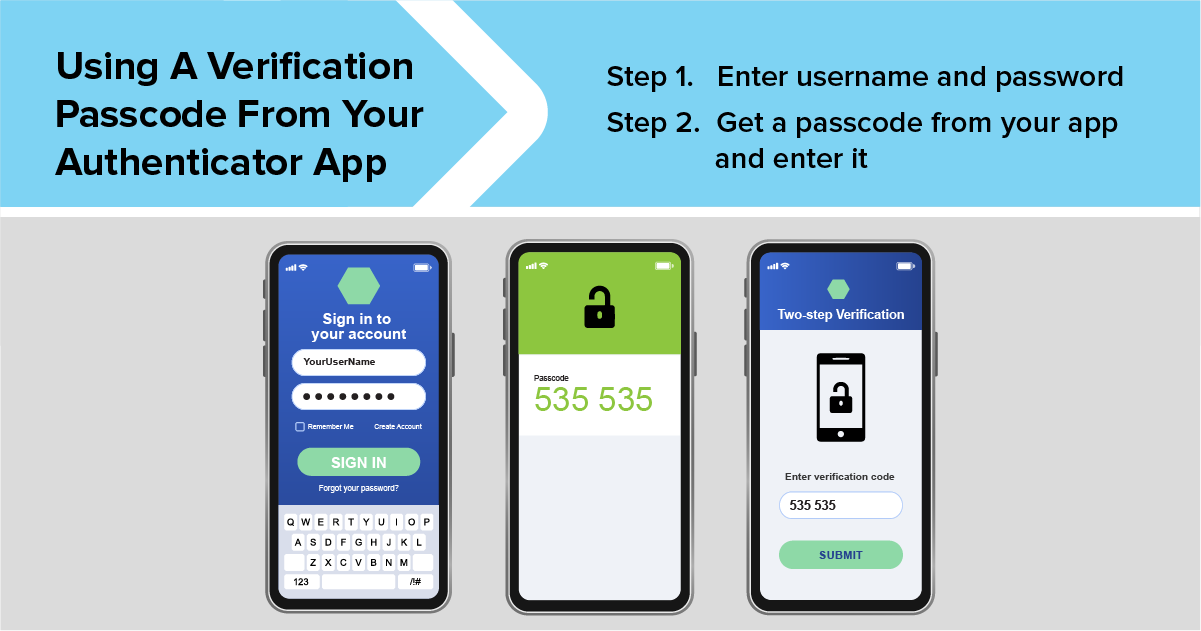
2. Enable Multi-Factor Authentication (MFA/2FA) Everywhere
Even with a strong password, MFA adds a crucial layer by requiring a second verification step, like a code from an app or hardware key.
In 2026, SMS-based 2FA is less secure due to SIM-swapping attacks—opt for authenticator apps (Google Authenticator, Authy) or hardware keys (YubiKey).
Why it matters: MFA blocks 99% of automated attacks, according to Microsoft reports.
Example: High-profile celebrity account hijacks often succeed without MFA enabled.
Enable it on email, banking, social media, and cloud services first.
3. Recognize and Avoid Phishing Attempts
Phishing remains the top attack vector, often via email, SMS, or fake websites tricking you into sharing info.
Tips:
- Check sender addresses carefully (e.g., typos like "support@paypaI.com").
- Hover over links before clicking—verify URLs.
- Avoid urgent demands for action or personal info.
- Use browser extensions like uBlock Origin or phishing detectors.
Example: AI-generated deepfake voice calls impersonating family members are rising in 2026—always verify requests for money.
4. Keep Software, Apps, and Devices Updated
Updates patch known vulnerabilities that hackers exploit.
Enable automatic updates on operating systems (Windows, macOS, iOS, Android), browsers, and apps. In 2026, zero-day exploits target outdated software quickly.
Example: The Equifax breach stemmed from an unpatched Apache vulnerability.
5. Use a VPN on Public Wi-Fi and for Privacy
Public networks are hotspots for man-in-the-middle attacks.
A Virtual Private Network (VPN) encrypts your traffic. Choose no-log providers like ProtonVPN, Mullvad, or ExpressVPN.
Also use VPNs to bypass geo-restrictions safely and protect against ISP tracking.
6. Practice Safe Browsing and Downloading Habits
Avoid suspicious websites, pirated content, and unverified downloads—these often carry malware.
- Use HTTPS sites (browser padlock icon).
- Install antivirus/anti-malware (e.g., Malwarebytes, Windows Defender).
- Be cautious with pop-ups and free offers.
7. Additional Tips for Comprehensive Protection
- Secure your home network: Change default router passwords, use WPA3 encryption.
- Monitor accounts: Set up alerts for logins and transactions; use dark web monitoring services.
- Be mindful on social media: Limit shared personal info to reduce doxxing risks.
- Educate yourself: Follow sources like Krebs on Security or stay updated via newsletters.
- Backup data: Regularly back up to external drives or secure cloud for ransomware recovery.
Conclusion
Staying safe online in 2026 requires proactive habits rather than perfect tech. By implementing strong passwords, MFA, vigilant phishing avoidance, updates, VPNs, and safe practices, you drastically reduce risks. Cybersecurity is ongoing—review your settings regularly and stay informed. Empower yourself with these tools and knowledge for a secure, enjoyable digital life. Start today: enable MFA on your main accounts and audit your passwords.